SongPro 5 is even easier to
use and offers you more features
Whilst professional, feature rich and covering every requirement it's also very simple, quick and intuitive for the novice user. "We had an eleven year old operate SongPro during the service for the first time after only ten minutes tuition". A walk in the park! Our search facility enables the user to display anything unplanned 'Live' in seconds. |
|
 |
Full text-content searching
Just type in any part of the title, verse, or chorus
- it really is that simple!
Can't remember the name of a song? just simply type in a few words from a verse or chorus - there it is!
Songs may also be filtered by
category,
author and key. |
SongPro's full Bible-text search
(any word or phrase) makes pre-planning easy. The
operator can easily keep up with the speaker as Bible
references are quoted, and different versions of the Bible
can instantly be switched from one to another for comparison. Remember some scripture from the Bible but not quite sure of the Book, Chapter or verse? No problem, again just type it in to find.
|
 |
 |
Advanced video and graphics -
Play pre-queued video files or
use videos for backgrounds to projected text. Also use moving
video images from a live camera feed as your background to songs and liturgy etc. |
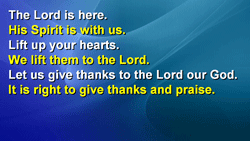
Use mixed font attributes for liturgy and songs (ie colour, bold, italic) for each line of text.
This can be used to distinguish between leader and
response text, or men's and women's song parts etc. |
 |
 |
Videos and images supplied
The
background image library supplied with SongPro has
been increased to over 300 images with a choice of either 16:9 wide screen or 4:3 format, and of course you may add
your own. |
Integrate PowerPoint
presentations into the
service plan, and using the slide preview feature, start the
presentation from any slide. |
 |
|
Planning is simple!
Simply search for your song and add it to the plan - the list can then be
printed out for musicians, leaders etc or emailed to them.
New songs can easily be added and be available for immediate
use, all without the need for photocopies, acetates, inserts
or page re-numbering. SongPro is compatible with cloud syncing software such as Dropbox so that you can keep all your data instantly synchronised. |
Cloud Syncing
SongPro harnessess the power of the cloud for syncing your data, giving freedom to use any of the most popular cloud storage service providers available, Dropbox, Google Drive, Microsoft's OneDrive etc.
Utilising these services allows you to deploy content over multiple machines. No more transporting USB drives or CDs to different machines or manually entering a service plan - it's all there in the cloud, and automatic.
Simply prepare anywhere - the church PC will be ready for use! |
 |
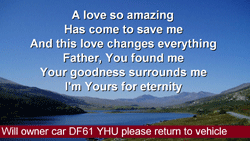 |
Show
notices and notification messages
Set up Eye-catching notices that can be displayed
automatically, cycling through each one in turn and
shown for a pre-defined time. 'Welcome' messages can
also be displayed, complete with your Church logo.
Display a "breaking news" style notification message at any time for that
important nursery call or parking problem. |
Your
favourites
Your own songbook - very handy to help with planning where items are frequently used. To add to favourites, simply right-click the item and select. Favourites are colour coded in blue for convenience. |
 |
 |
Automatic song-use monitoring
All songs used are automatically registered,
and when CCLI registration is due, a reminder will
prompt you and the data can be generated to assist you in completing the report. Now includes online reporting.
|
Extended-desktop capability
Most PCs come with extended desktop capability. For others two video outputs from your PC are all that you need for
extended-desktop use. The preparation screen on one, and the
output to the projector. If your projector has RS232
(serial) communication, then keyboard control of projector
functions (eg freeze/blank) is also possible.
|
|
 |
Easy to import new songs
Simply copy and paste a new song into the database,
or import a text file with a collection of songs. |
 optional additional software not included with SongPro optional additional software not included with SongPro |
|
|
|
|
This product was created in England, United Kingdom. US spelling is an option within the program. Other langauge Bibles supplied are as follows: Portuguese, German Schlachter, Spanish RV, Italian Riveduta, French LSG, Norwegian, Swedish, Dutch SVV, Albanian, Afrikaans.
|